Xbox Nano Controller: Price, Release Date, and Is It Worth Buying?
Microsoft's smallest-ever gamepad is cheaper and lighter than a phone clip-on controller, but it works differently than Backbone or Razer Kishi. Here's what to know before you pre-order.
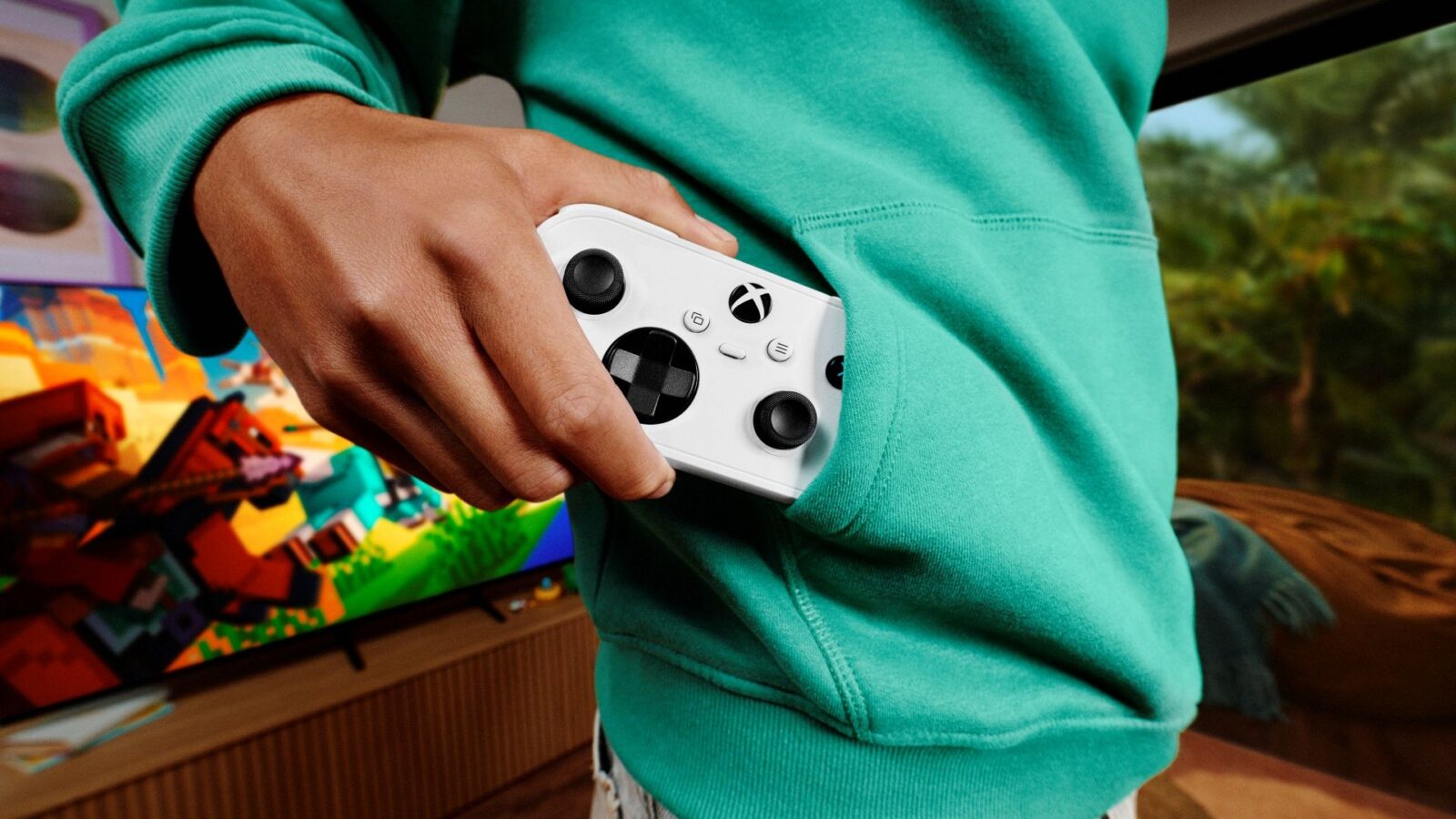
The Xbox Nano Controller costs $49.99, pre-orders are open now at xbox.com, and shipping starts in November 2026 in the US, UK, and more than 30 other markets. It's a full wireless Xbox gamepad shrunk down to just over 5 inches long and 3.5 ounces — Microsoft's smallest controller yet — and it keeps all 18 standard inputs rather than cutting buttons to save space. Here's what it actually is, how it's different from a phone clip-on controller like Backbone or Razer Kishi, and whether it's worth buying.
- Price: $49.99 USD (varies by country)
- Release: November 2026, pre-orders open now
- Size/weight: ~5.1 inches long, 3.5 ounces
- Connects via: Xbox Wireless and Bluetooth
- Works with: Xbox Series X|S, Xbox One, Windows 10/11 PC, Android, iOS, select smart TVs
- Charging: Rechargeable internal battery, USB-C cable sold separately
What is the Xbox Nano Controller?
Microsoft announced the Nano Controller on Xbox Wire on October 14, 2026, under general manager James Hunter's Xbox Accessories team. It's a standard-layout Xbox gamepad — same 18 inputs you'd find on an Xbox Wireless Controller, including both analog sticks, the D-pad, bumpers, and triggers — just built into a much smaller shell. Microsoft says it's shorter and lighter than most modern smartphones, which makes it easy to drop in a bag or a jacket pocket.
It also adds one extra button beyond the standard layout: a programmable Action Button that can be set to a shortcut like taking a screenshot, starting a game-clip capture, or another frequently used function.
Build, feel, and the Action Button
Microsoft hasn't published exact grip or stick dimensions beyond the overall length and weight, but the pitch is clear from the product photography and copy: this is a full gamepad layout squeezed into a shell small enough to disappear in a jacket pocket, not a stripped-down or novelty controller. Every input from the standard Xbox Wireless Controller carries over — both analog sticks, D-pad, four face buttons, bumpers, triggers, View and Menu buttons, and the Xbox button — plus the new Action Button.
That Action Button is the one genuinely new piece of hardware here rather than a smaller version of something that already existed. Microsoft frames it as a shortcut key you program yourself, with screenshot capture and game-clip recording as the headline examples, which matters more on a controller this size since there's no room to add a second shoulder button or paddle the way premium pads do.
Price and release date
Pre-orders opened October 14, 2026, through xbox.com at $49.99 in the US. Microsoft says pricing and availability vary by country; UK coverage has put the price at roughly £44.99. The controller ships in November 2026 across a long list of markets Microsoft named in its announcement, including the US, UK, Canada, Australia, Germany, France, Italy, Spain, Japan, Korea, Mexico, Brazil, and more than 20 others, with Microsoft saying additional markets will follow. Xbox hasn't published an exact calendar date for general availability beyond "November" in its own announcement, though that's one of the first details buyers will want confirmed before ordering.
What it works with (and a naming mix-up to avoid)
One mix-up worth flagging before you search further: PowerA sells its own, separate "Nano" line of officially licensed, wired mini controllers for Xbox Series X|S that has existed for years and has nothing to do with this product. Microsoft's Nano Controller is made and sold directly by Xbox, connects wirelessly rather than by cable, and is the one covered in this guide — double-check the seller and listing if you're shopping by search result rather than going straight to xbox.com.
According to Xbox's own product listing, the Nano Controller connects over Xbox Wireless to Xbox Series X|S and Xbox One consoles, and over Bluetooth to Windows 10/11 PCs, Android and iOS phones and tablets, and compatible smart TVs running the Xbox app. That's the same basic connectivity as Microsoft's full-size Xbox Wireless Controller — the Nano isn't a cloud-gaming-only or mobile-only device, it's a genuine replacement controller that happens to be much smaller.
One thing it does not include: a USB-C cable. Charging requires a USB-C cable that Microsoft sells separately, so budget for one if you don't already have a spare.
Nano Controller vs. the standard Xbox Wireless Controller
The Nano isn't replacing Microsoft's full-size Xbox Wireless Controller as the default pack-in pad — it's a smaller, cheaper companion to it. Both use the same Xbox Wireless and Bluetooth connectivity, so games and third-party apps treat them identically, and the Nano's $49.99 price already undercuts the standard pad. The standard Xbox Wireless Controller ships with AA batteries rated for up to 40 hours per Microsoft's own listing, with a rechargeable battery pack sold as an optional add-on; the Nano instead builds in a rechargeable battery from the start, at the cost of needing a USB-C cable (not included) to top it up. The main tradeoff for the Nano is physical: Microsoft's own description puts it at just over 5 inches and 3.5 ounces, visibly smaller and lighter than the full-size pad, which is why it's pitched as a travel and backup controller rather than a primary one for long sessions.
How to set it up
Pairing follows the same process as any other Xbox Wireless Controller. On a console, press and hold the controller's pair button until the Xbox button starts flashing, then select it from the console's Bluetooth/accessories menu. On Windows, Android, or iOS, put the controller into pairing mode the same way and select "Xbox Nano Controller" from the device's Bluetooth settings — handy if you've also set up the Xbox Full Screen Experience on a handheld or TV and want a proper controller to go with it. Because it supports both Xbox Wireless and Bluetooth, you can pair it directly to a console without a receiver, and separately to a phone or PC over Bluetooth — it will remember multiple paired devices, as Xbox Wireless Controllers already do.
Launch bundles
For the 2026 holidays, Microsoft is running two US bundle promotions tied to the Nano's launch. Buyers of select Samsung TVs can get a Nano Controller plus two months of Xbox Game Pass Ultimate for new members, aimed at cloud gaming through the Xbox app on Samsung's Gaming Hub. A similar offer bundles a Nano Controller and two months of Game Pass Ultimate with a Meta Quest purchase. Microsoft's own examples of games to try with the controller include local co-op in Minecraft Dungeons II and driving in Forza Horizon 6. Game Pass Ultimate is Microsoft's top Game Pass tier, bundling cloud gaming, console and PC game libraries, and online multiplayer, so pairing two free months of it with a $49.99 controller effectively lets a new Samsung TV or Meta Quest owner try cloud gaming on their new screen without buying a console at all.
Nano Controller vs. phone clip-on controllers
The Nano is easy to confuse with phone clip-on controllers like Backbone or Razer's Kishi line, since all of them target portable, pocketable play. They're built differently, though. The Nano is a standalone wireless gamepad you hold on its own — it doesn't physically attach to your phone. Clip-on controllers like the Razer Kishi V3 clamp around your phone and usually connect over a wired USB-C link rather than Bluetooth, which cuts input lag for cloud gaming but means the controller and phone move as one unit.
| Controller | Price | Form factor | Connection | Best for |
|---|---|---|---|---|
| Xbox Nano Controller | $49.99 | Standalone mini gamepad | Xbox Wireless / Bluetooth | Console, PC, and phone play with one controller |
| Razer Kishi V3 | $99.99 | Phone clip-on | Wired USB-C | Low-latency cloud/remote play on one phone |
| GameSir G8 Plus | Below Kishi V3 at most retailers | Phone clip-on | Wired USB-C | Budget clip-on with Hall effect sticks |
Razer's Kishi V3 is listed at $99.99 on razer.com and officially supports iPhone 15/16/17 and many Android phones over a wired connection, plus cloud and remote-play services like Xbox Cloud Gaming, GeForce Now, PlayStation Remote Play, and Steam Link. The GameSir G8 Plus is generally positioned as the budget option in that comparison and typically sells for less than the Kishi line at retail, though GameSir doesn't publish one fixed global list price the way Razer and Microsoft do — check current retailer pricing before buying.
In short: if you mainly stream games to your phone and want the lowest possible latency, a wired clip-on like the Kishi V3 is the more purpose-built pick. If you want one controller that also works on your Xbox console and PC — and costs half as much — the Nano is the better fit.
Who should buy it
The Nano Controller makes the most sense if you already own an Xbox console or play on PC and just want a cheap, pocketable backup controller — for travel, for a second player who drops by occasionally, or for cloud gaming on a phone without committing to a phone-mounted rig. At $49.99 it undercuts both major clip-on brands while still covering consoles and PC, which standalone clip-ons don't do as cleanly.
It's a weaker pick if phone-first cloud gaming is your main use case and you want the lowest latency possible, since a wired clip-on avoids the small amount of extra lag Bluetooth can introduce. It's also worth noting Microsoft hasn't mentioned Hall effect or TMR analog sticks for the Nano, the drift-resistant stick technology some rivals now use, so heavy, years-long use is the scenario where a pricier controller's stick hardware could end up mattering more.
Is there a catch?
A few details are worth weighing before you pre-order. Microsoft's own announcement and product page don't state a battery life figure for the Nano, unlike the standard controller's clearly listed "up to 40 hours" on AA batteries — so expect to charge it more often than you would a controller with a fresh set of alkalines, without a published number to plan around. The USB-C charging cable also isn't included, which is an easy extra cost to miss if you don't already own one. And as noted above, Microsoft hasn't mentioned Hall effect or TMR magnetic sensors in the analog sticks, the stick technology several newer controllers use specifically to resist long-term drift — not a dealbreaker at $49.99, but a reasonable question to ask if you plan to use it daily for years rather than as an occasional backup.
How to pre-order
Pre-orders are live now directly through Microsoft's Xbox Nano Controller product page at xbox.com, with availability expanding to retailers as the November ship window approaches. Microsoft hasn't listed color options beyond the white model shown in its own product photography as of this guide's publication.
What to do next
If you want the cheapest way to add a second (or travel-friendly) Xbox-compatible controller, pre-order the Nano now at xbox.com for $49.99 and pick up a USB-C cable if you don't have a spare — it isn't included. If low-latency phone streaming is the priority instead, compare it against the Razer Kishi V3 at $99.99 before deciding, since the two solve slightly different problems despite the similar "pocketable controller" pitch.
Frequently asked questions
How much does the Xbox Nano Controller cost?
It costs $49.99 in the US, with Microsoft saying pricing varies by country; UK listings put it at roughly £44.99.
When does the Xbox Nano Controller come out?
Pre-orders opened October 14, 2026 at xbox.com, with shipping starting in November 2026 across the US, UK, and more than 30 other markets.
Does the Xbox Nano Controller work on PC and phones, or only Xbox consoles?
All of the above. It connects over Xbox Wireless to Xbox Series X|S and Xbox One, and over Bluetooth to Windows 10/11 PCs, Android and iOS devices, and compatible smart TVs.
Is the Xbox Nano Controller the same as the PowerA Nano?
No. PowerA sells a separate, long-running "Nano" line of wired mini controllers. Microsoft's Nano Controller is a different, wireless product sold directly by Xbox.
Does the Xbox Nano Controller come with a charging cable?
No. It has a rechargeable internal battery, but the USB-C cable needed to charge it is sold separately.
Is the Xbox Nano Controller better than a Backbone or Razer Kishi?
They solve different problems. The Nano is a standalone wireless controller that also works on Xbox consoles and PC, while Backbone and Razer Kishi clip onto a phone and connect by wire for lower-latency phone streaming.
Sources
Jonah Reyes leads Pandromeda's gaming coverage: console and handheld hardware, release dates, pricing changes, patch notes and the business moves behind the biggest franchises. He sources every date and price from the platform holders and publishers themselves, and says plainly when something is still only a rumour.