What Is Google Antigravity? How It Works and What It Costs
A plain-language guide to Google's agent-first coding platform: what it does, which models it runs, what it costs, and how to install it.
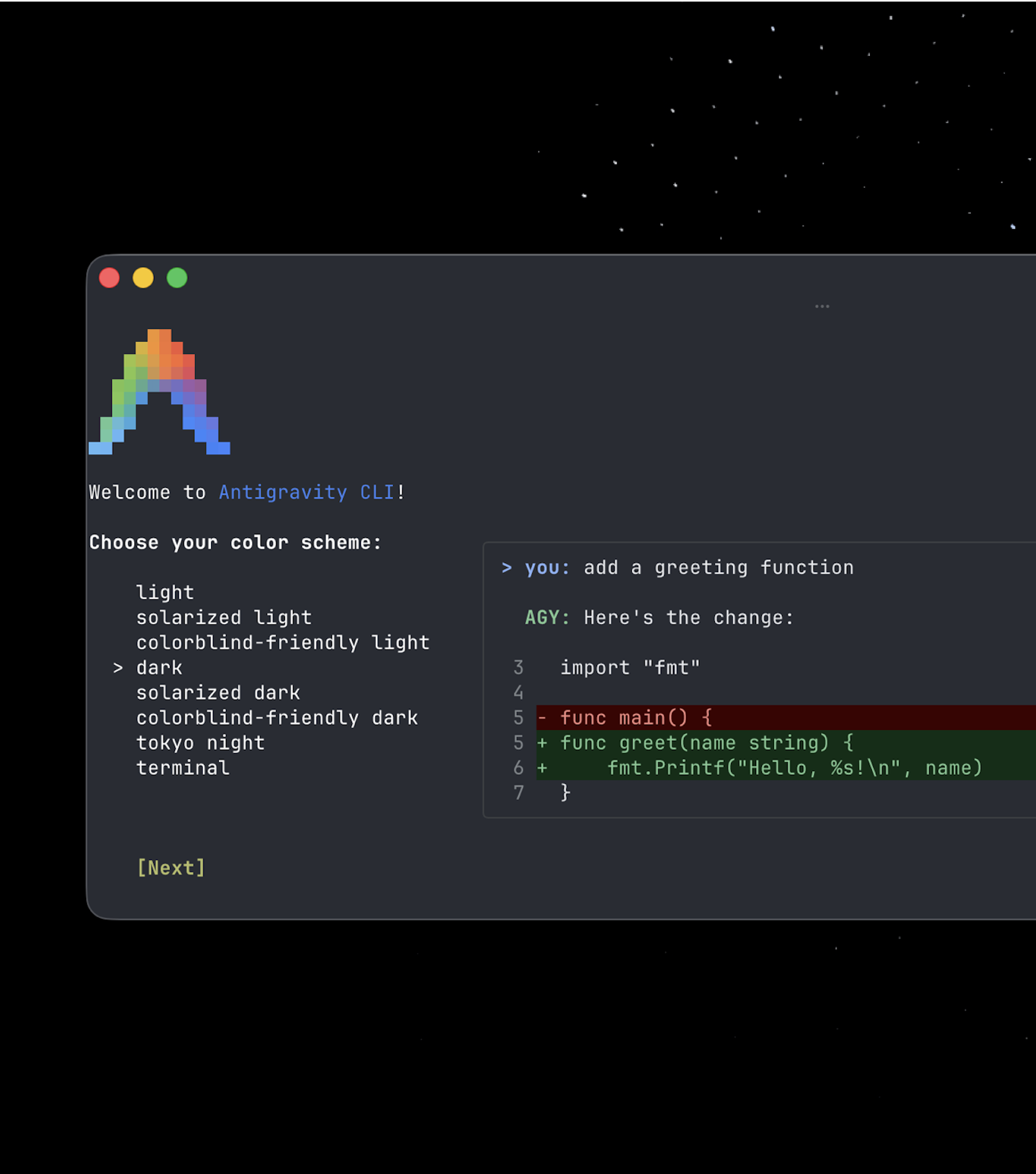
Google Antigravity is Google's agentic development platform: a free-to-start suite of a desktop app, a terminal CLI, IDE extensions, and a Python SDK that let AI agents plan, write, run, and verify code across your editor, terminal, and browser, rather than just autocomplete it. It is built around Google's Gemini models (plus select third-party models on paid plans), it is free for individuals, and you get it by downloading the Antigravity app or installing the CLI from antigravity.google.
- What: An agent-first development platform, not just a code editor
- Maker: Google (Google DeepMind / Google Cloud)
- Launched: November 18, 2025, as a free public preview
- Status now: Individuals tier is Generally Available, free, no preview label
- Surfaces: Antigravity App (desktop), Antigravity CLI (
agy), Antigravity IDE (extensions + standalone), Antigravity SDK (Python) - Price: $0/month for individuals; paid Google AI Pro and Ultra plans unlock more quota and extra models
- Core model: Gemini 3.8 Flash on every plan; Gemini 4 Argon on paid plans only
- Platforms: macOS, Windows, Linux, and ChromeOS devices
What is Google Antigravity?
Google introduced Antigravity on its developer blog as something broader than a code editor: "Antigravity isn't just an editor—it's a development platform." The pitch is an agent-first interface where AI agents don't just suggest the next line of code, they plan a task, execute it across multiple tools, and produce evidence you can check before trusting the result.
That distinction matters because most AI coding tools before Antigravity worked one of two ways: inline autocomplete inside an editor, or a chat-style assistant you prompt turn by turn. Antigravity adds a third mode, an asynchronous "Agent Manager" that can run several agents at once, each working in its own workspace, while you check in on their progress instead of babysitting a single conversation.
How Google Antigravity works
Antigravity now spans four surfaces that share the same underlying agent harness:
- Antigravity App — a desktop command center for running multiple local agents in parallel, organizing them into Projects and workspaces, and scheduling recurring automations.
- Antigravity CLI — a terminal-first tool (binary name
agy) for running autonomous coding agents, executing shell commands, and managing background subagents without leaving the terminal. - Antigravity IDE — the original, fully agentic editor, available as a standalone app or as an extension inside VS Code, JetBrains IDEs, Visual Studio, Zed, or Xcode, with an Agent Manager panel built in.
- Antigravity SDK — a Python package (
pip install google-antigravity) for developers who want to build their own custom agents on top of Antigravity's harness, with a high-level Agent class plus lower-level conversation and connection APIs, source published on Google's antigravity-sdk-python GitHub repo.
Inside any of these surfaces, you can move between a hands-on editor view for synchronous work and the Agent Manager for dispatching asynchronous tasks — in the desktop app and IDE that's a keyboard shortcut (Cmd+E or Ctrl+E) away. A typical workflow looks like: you describe a feature or bug fix, the agent drafts an implementation plan, writes the code, launches the app from the terminal, and checks the result in a real Chrome browser window through a built-in /browser command for debugging and visual verification.
Artifacts: how you check an agent's work
Because agents in Antigravity can touch the editor, terminal, and browser on their own, Google built a review layer called Artifacts. Instead of scrolling through raw tool-call logs, you get structured deliverables — task lists, implementation plans, step-by-step walkthroughs, and screenshots or browser recordings — that summarize what the agent actually did. You can open the Artifact Review screen with Ctrl+R, and you can comment directly on an Artifact the way you'd comment on a shared document; the agent incorporates that feedback without having to restart the whole task. Agents can also save useful context and reusable code snippets to a project knowledge base so later tasks start with more context.
Permissions, review, and how much control you keep
Handing an agent access to your terminal, file system, and a live browser raises an obvious question: how much can it do without asking first? Antigravity builds that control into the product rather than leaving it as an afterthought. The App's message box includes a permissions picker so you can set how much an agent is allowed to do unsupervised versus how often it has to pause and ask. A /plan command, added in a recent App update, makes an agent draft a written plan for your review before it starts writing or running anything, and Google has a dedicated Plan Review Policy setting that controls how strictly that review step is enforced across a workspace.
The same caution carries over to the SDK: by default, an Agent instance built with the Python SDK runs in read-only mode, and write-capable tools, such as ones that edit files or run shell commands, stay disabled until a developer explicitly turns them on through a capabilities configuration object. That default-safe posture matters more as Antigravity leans further into unattended, scheduled work — the App now supports naming and running recurring "Automations" (renamed from Scheduled Tasks) and messaging subagents directly while a larger task is still running, rather than only reviewing finished output after the fact.
Which AI models power Antigravity
Antigravity is model-flexible, but access depends on your plan. According to Google's own models documentation, every plan — including the free Individuals tier — gets unlimited Tab completions and Gemini 3.8 Flash as the core agent model. Beyond that, availability splits by tier:
| Model | Free / Individuals | Google AI Pro | Google AI Ultra |
|---|---|---|---|
| Gemini 3.8 Flash | Yes | Yes | Yes |
| Gemini 4 Argon | No | Yes (separate weekly quota) | Yes |
| Claude Sonnet 4.6 / Opus 4.6 (Thinking) | Yes* | Yes* | No |
| Claude Sonnet 5.5 / Opus 5.5 (Thinking) | No | Yes | Yes |
| GPT-OSS-120b | Yes* | Yes | Yes |
*Google's documentation flags that Claude Sonnet 4.6, Claude Opus 4.6, and GPT-OSS-120b are scheduled to be removed from the free tier on November 2, 2026, after which free-tier access narrows to Gemini models. If you're relying on a specific non-Gemini model on the free plan, check antigravity.google's models page before that date lands.
Gemini 4 Argon, Google's newer reasoning-focused model, is notably not available inside the standalone Antigravity IDE as of this writing — Google has it rolling out first through the App, CLI, and IDE extensions for paid Pro and Ultra subscribers, with its own separate weekly quota on top of the Gemini 3.8 Flash allowance.
What does Google Antigravity cost?
Antigravity itself has no standalone subscription price — it rides on Google's existing AI plan tiers, plus a separate business track through Google Cloud:
Full tier-by-tier pricing and FAQs live on Antigravity's official pricing page.
| Plan | Price | What you get |
|---|---|---|
| Individuals | $0/month | Access to a range of agent models, unlimited Tab completions, unlimited command requests, and a "meaningful quota" refreshed weekly |
| Google AI Pro | Google's standard Pro subscription price | Everything in Individuals, plus higher quota refreshed roughly every five hours, and access to Gemini 4 Argon and Claude Sonnet/Opus 5.5 |
| Google AI Ultra | Google's standard Ultra subscription price | Everything in Pro, plus the highest quota and full third-party model access |
| Business (via Google Cloud) | Standard/Plus from $30 per seat/month; pay-as-you-go has no seat fee | API-based, consumption-priced access for Gemini Enterprise customers, with spend caps and centralized admin controls |
Beyond the baseline quota, Pro and Ultra users can draw on a flexible AI credit pool, billed at standard Gemini Enterprise consumption pricing, and can choose whether unused baseline quota automatically falls back to credits or simply waits to refresh. Google's plans documentation doesn't publish exact numeric rate limits — it describes them only as "subject to modification" based on capacity — so treat any specific request-count figure you see elsewhere as a snapshot rather than a guarantee.
How to get Google Antigravity
- Desktop app: Download the installer for macOS, Windows, Linux, or a ChromeOS device from Antigravity's download page. On macOS, open the
.dmgand drag Antigravity into Applications; Windows uses a standard.exe, Linux a.tar.gzarchive. - CLI: Run
curl -fsSL https://antigravity.google/cli/install.sh | bash, which installs theagybinary to~/.local/bin/agy. Confirm it worked withagy --version, then launch a session by runningagyinside a project folder. - IDE extension: Install the Antigravity extension inside VS Code 1.90+, a JetBrains IDE 2026.2.1+, Visual Studio 17.8+, Zed 0.140.0+, or Xcode 27 beta 6+ — or install the standalone Antigravity IDE build instead.
- SDK: In a Python 3.10+ environment, run
pip install google-antigravity, set aGEMINI_API_KEYenvironment variable, and build against the Agent class.
No credit card is required for the free Individuals tier; upgrading to Pro or Ultra happens through your existing Google AI subscription settings.
Antigravity for teams and enterprises
Individual developers aren't the only audience Google is building Antigravity for. Organizations that are already Gemini Enterprise customers can roll Antigravity out through a Business plan billed via Google Cloud, which drops the per-seat flat fee entirely for a pay-as-you-go option or starts at $30 per seat per month for Standard and Plus tiers with consumption-based usage on top. The enterprise track adds centralized administrative controls and spend caps so an engineering organization can set usage ceilings before turning agents loose across a whole codebase, plus access to additional Gemini model variants — including Gemini 3.7 Flash, 3.6 Flash, and 3.1 Pro — that aren't offered on the free or Pro consumer tiers.
Who Antigravity is actually for
Google frames Antigravity around three recurring scenarios in its own materials: delegating a multi-step feature (write code, launch it, test it in a real browser) to a single agent; requesting a UI change and reviewing the result through Artifacts instead of a diff; and dispatching background work, like reproducing a reported bug, writing a regression test, and shipping the fix, while you keep working on something else. That makes it most useful for individual developers and small teams who want an agent to own a task end to end rather than just suggest the next few lines, and for engineering orgs evaluating a Google-native alternative to agent-first coding tools from Anthropic and other vendors — Pandromeda has a closer look at how Antigravity compares against Claude Code and against Cursor on pricing and features for readers deciding between tools.
It's less of a fit if you just want inline autocomplete with minimal setup, or if your workflow depends on a specific non-Gemini model that's leaving the free tier on November 2. For context on how rival AI labs are structuring their own agent tooling, see Pandromeda's explainer on how Anthropic's Agent Skills work.
What's next for Antigravity
Google has kept shipping Antigravity at a fast clip since the November 2025 preview: the App's own changelog shows weekly point releases through October 2026 adding features like a permissions picker, drag-and-drop conversation management, a plugin marketplace, and a /plan command that drafts a reviewable plan before the agent touches code. The most consequential near-term date for current users is November 2, 2026, when Claude Sonnet 4.6, Claude Opus 4.6, and GPT-OSS-120b are due to drop off the free tier, narrowing free access to Gemini models. Expect continued expansion of Gemini 4 Argon availability beyond paid Pro and Ultra users, and further build-out of the CLI and SDK surfaces as Google positions Antigravity as its answer to agent-first coding tools from rivals. Readers who want the week-to-week detail can follow Google's own Antigravity changelog directly.
Frequently asked questions
What is Google Antigravity?
Google Antigravity is Google's agentic development platform: a desktop app, terminal CLI, IDE extensions, and a Python SDK that let AI agents plan, write, run, and verify code across your editor, terminal, and browser, built mainly on Google's Gemini models.
Is Google Antigravity free?
Yes. The Individuals tier is free at $0/month with unlimited Tab completions and command requests plus a weekly usage quota. Google AI Pro and Google AI Ultra are paid upgrades that add higher quotas and extra models, including Gemini 4 Argon.
How do I download Google Antigravity?
Download the desktop app for macOS, Windows, Linux, or ChromeOS from antigravity.google's download page, install the CLI with the official install script, add the IDE extension to an editor like VS Code or JetBrains, or install the Python SDK with pip install google-antigravity.
What AI models does Antigravity support?
Every plan includes Gemini 3.8 Flash. Paid Pro and Ultra plans add Gemini 4 Argon and Claude Sonnet/Opus 5.5. Claude Sonnet 4.6, Claude Opus 4.6, and GPT-OSS-120b are available on the free tier only until Google removes them on November 2, 2026.
Is Google Antigravity still in preview?
No. The free Individuals tier is now listed as Generally Available on Google's own pricing page, a step up from the free public preview status it launched with in November 2025.
How is Antigravity different from a normal AI coding assistant?
Instead of only suggesting code inline, Antigravity's Agent Manager lets agents run multi-step tasks across the editor, terminal, and a real browser on their own, then report back through reviewable Artifacts like implementation plans, walkthroughs, and screenshots.
Sources
- Google Developers Blog: Build with Google Antigravity, our new agentic development platformdevelopers.googleblog.com
- Antigravity official pricing pageantigravity.google
- Antigravity docs: supported modelsantigravity.google
- Antigravity docs: getting startedantigravity.google
- Antigravity docs: plans and quotasantigravity.google
- Antigravity SDK for Python on GitHubgithub.com
Theo Park runs the AI desk at Pandromeda. He follows model launches from the frontier labs and the open-weight community, tracks the assistants and developer tools built on them, and explains what each release changes on pricing, capability and safety. His reporting leans on primary sources: model cards, technical reports, API documentation and the companies' own announcements.