Meta Muse Voice Chat Is Here: How to Talk to Your AI Avatar
Meta’s Muse app now answers back in hundreds of voices through an animated avatar you can talk to in real time — here is how the rollout works.
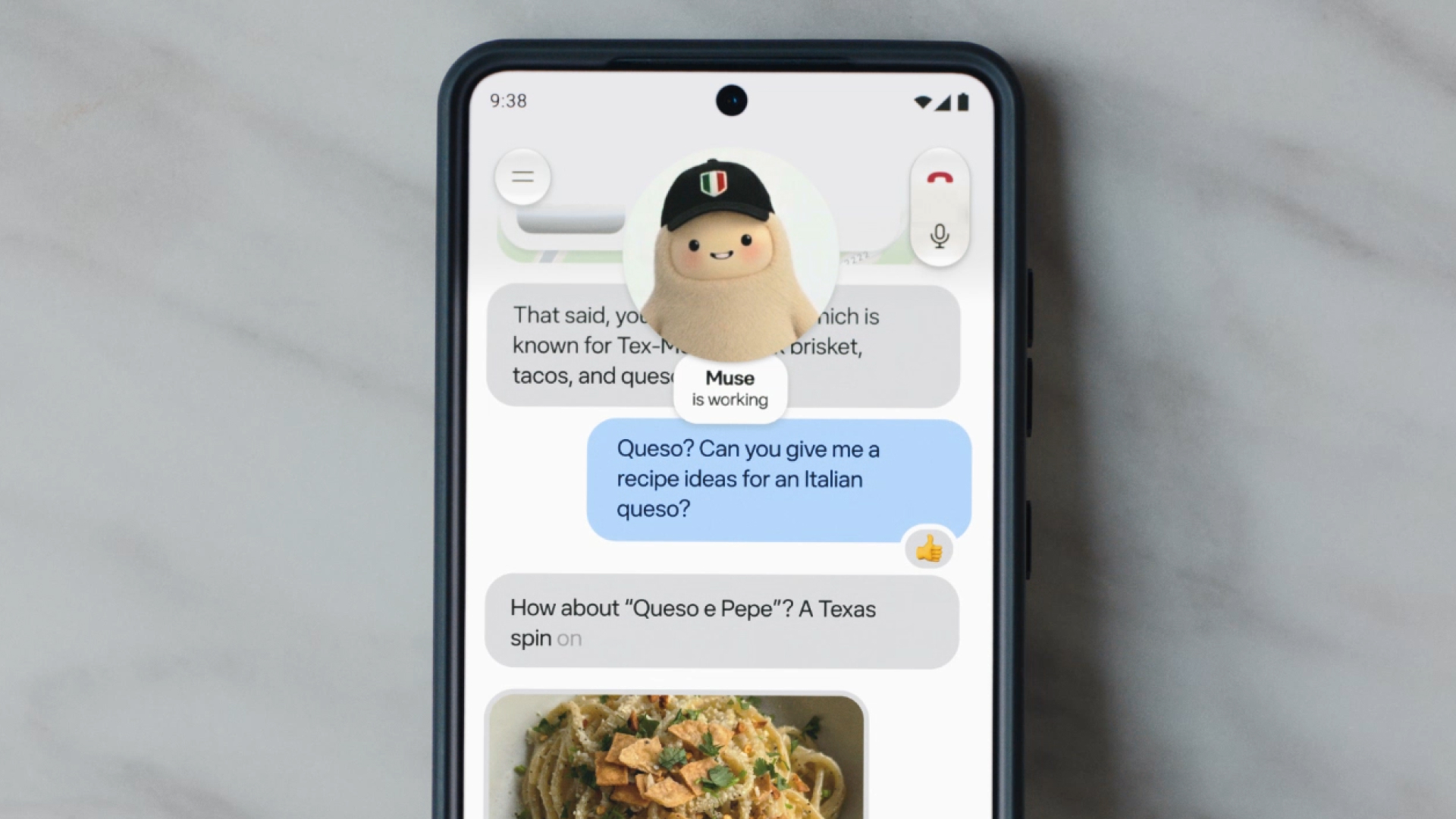
Meta has started rolling out real-time voice conversations and an expressive, talking avatar inside its Muse app, letting people on mobile, web, and Mac tap a phone icon and simply talk to their Muse AI agent instead of typing, while it keeps working on tasks in the background. The feature, announced in a November 5, 2026 Meta newsroom post titled "Give Your Muse a Voice," is live now in the United States, with hundreds of voice and speaking styles to pick from and support for AI Glasses and the Muse Charm wearable coming later.
- Announced: November 5, 2026, on Meta's official newsroom (about.fb.com)
- What's new: Real-time, back-and-forth voice conversations plus an expressive animated avatar
- Where: Muse app on mobile, web, and Mac — starting in the US
- How to use it: Tap the phone icon in the top-right corner of the Muse app
- Voices: "Hundreds" of voices and speaking styles, changeable at any time
- Coming later: Voice conversations on Ray-Ban Meta-style AI Glasses and the Muse Charm device — no date given
- Price: Meta has not announced any new charge for voice or avatars
What Meta actually announced
In its post "Give Your Muse a Voice", Meta says it is "rolling out voice and expressive avatars in the Muse app, giving you a new, natural way to interact with your Muse." The company frames it as a shift away from typing prompts and waiting for text: you can now talk through an idea out loud, hear Muse respond immediately, and interrupt it mid-sentence the way you would in a normal conversation.
Muse itself is one of several AI efforts Meta Platforms has consolidated under its Meta AI umbrella over the past couple of years, alongside the Meta AI assistant that ships inside Facebook, Instagram, and WhatsApp (see Wikipedia's overview of Meta AI for background on how that broader effort has evolved). Muse, by contrast, is Meta's standalone agent app, built to carry out multi-step tasks rather than just answer questions, and voice is the newest way to direct it.
Two underlying systems make this work, according to Meta: "Muse Realtime Voice technology," which handles the fluid, low-latency back-and-forth audio, and "Muse Realtime Avatar," which renders the animated character that reacts as it listens and talks. Meta's post does not say which language model sits behind either system, and it does not mention pricing or quote any named executive — this write-up sticks to what the newsroom post and Meta's related posts actually state.
Meta had already teased this direction two months earlier. In its recap of Meta Connect 2026, the company described a "voice mode" for Muse and said it was bringing "a state of the art real-time voice model into a device that fits in your pocket" — a reference to the then-upcoming Muse Charm. The November post is the point where that preview turned into a shipping feature inside the main Muse app.
How to talk to your Muse right now
Meta's instructions are simple: open the Muse app on your phone, on the web, or on a Mac, and tap the phone icon in the top-right corner of the conversation screen. That starts a live voice session instead of a typed chat. You can speak naturally, pause, change your mind mid-thought, and interrupt Muse's response if you already have what you need — Meta says the system is built for fast turnaround and for being talked over, rather than forcing you to wait for a full reply before you can jump back in.
Because Muse keeps working on whatever task you've handed it while you keep talking, Meta positions voice as something you can use hands-free — "say what needs to get done while on a walk or when your hands are full," as the post puts it, with Muse "handling it in the background as you talk." That is a notable difference from a simple dictation feature: the agent is meant to keep acting on a task (drafting something, looking something up, planning a sequence of steps) while the conversation continues around it.
Three ways to see your Muse avatar
Alongside voice, Meta is introducing an avatar layer that gives Muse a visible, animated presence during a conversation — expressions and gestures that Meta says "match the conversation" as the avatar listens and speaks. Rather than forcing one fixed layout, Meta lets you choose how much of the avatar you actually want to see:
| Display mode | What you see | Best for |
|---|---|---|
| Voice only | No avatar, just the live conversation audio | Hands-free use, walking, driving, multitasking |
| Side-by-side | Avatar shown next to the ongoing text/task view | Keeping an eye on what Muse is working on while you talk |
| Full screen | Avatar fills the screen for a face-to-face feel | Rehearsing a conversation, presentation, or interview |
That flexibility matters for how people are likely to actually use this: a side-by-side or voice-only mode suits someone dictating notes or planning a trip while doing something else, while full screen is clearly built for the rehearsal use cases Meta calls out explicitly — practicing a job interview, running through a presentation, or refining a sales pitch before the real thing.
Hundreds of voices, swappable any time
Meta says there are "hundreds of voices to choose from, in a range of speaking styles," and that you aren't locked into one — you can change your Muse's voice whenever you like. The newsroom post doesn't break down the styles by category or name specific voice options, and Meta has not published a separate voice catalog alongside the announcement, so the exact range isn't independently verifiable beyond Meta's own "hundreds" figure.
This is a meaningfully larger selection than a typical single-assistant-voice setup, and it puts Muse's voice options in the same conversation as other large consumer voice assistants that offer multiple preset voices — though Meta's post frames this specifically as a personalization choice for an individual's Muse, not as a broader platform-wide voice system.
Because the voice can be swapped at any time, the choice of voice is also decoupled from the choice of avatar appearance and from the display mode you're using — you can run full-screen with one voice during a rehearsal session and switch to a different voice entirely for a quick voice-only check-in later, without losing any of your conversation history or task progress in between.
What Meta says voice is actually good for
Meta's own list of example uses is fairly narrow and practical rather than a sweeping pitch: brainstorming, trip planning, rehearsing for a job interview, practicing a presentation, and refining a pitch. The common thread across all five is that they're tasks people already do out loud, by nature, talking through ideas, running lines, or thinking aloud before committing something to a final form. Framing voice around that set of use cases is also a tacit acknowledgment that this is an enhancement to how you interact with Muse's existing abilities, not a new standalone capability — the agent you're talking to is still the same Muse that plans, drafts, and completes tasks when you type to it.
Where it's rolling out, and where it isn't yet
Per Meta's post, voice and avatars are live now in the Muse app on mobile, web, and on Mac — "starting in the US." Meta does not give a timeline for expanding beyond the US, nor does it list specific countries planned next. That mirrors how Meta rolled out the Muse app itself earlier in 2026: US-first, with international availability following later and announced separately when it happens.
Two other surfaces are explicitly called out as not ready yet: AI Glasses and the Muse Charm wearable. Meta's phrasing is "coming soon," with no date, version number, or regional detail attached. Given that Meta's Connect 2026 recap already described a "real-time voice model" built for a pocket-sized device, Muse Charm is the more clearly telegraphed destination for voice — but until Meta publishes a follow-up post, "soon" is the only timeline on record.
Why AI Glasses and Muse Charm matter here
Voice is a far more natural interaction model on a device without a keyboard or a large screen than it is on a phone. That's presumably why Meta is pointing voice at its AI Glasses line and the dedicated Muse Charm accessory specifically, rather than treating the app rollout as the end state. Neither device benefits as much from typed prompts, and both are built around glanceable or screen-light interaction, so a live avatar and fluid voice turn-taking are a more natural fit for them than for a phone screen where the full Muse app is already comfortable to type into.
Muse Charm in particular was positioned at Meta Connect 2026 as a small, dedicated hardware companion for Muse rather than a general-purpose device, and Meta's Connect recap already referenced a "real-time voice model" built to run on something pocket-sized — language that lines up with what shipped in the November app update, even though the two posts describe the rollout separately. Meta hasn't detailed whether the "soon" rollout to glasses and Charm will arrive avatar-and-all, or voice-first with the animated avatar following later, so that distinction remains unconfirmed until Meta says otherwise.
How this fits into Meta's broader Muse lineup
Meta has been building out a family of Muse-branded releases through 2026, and it's worth being precise about which one this is. The Muse Wonder model that powers much of the app's conversational reasoning is a separate release from the voice and avatar layer covered here — Meta's "Give Your Muse a Voice" post doesn't name Wonder, Spark, or any other model as the engine behind the new voice technology, describing it only as "Muse Realtime Voice technology" and "Muse Realtime Avatar."
Meta has also shipped an open-weight branch of the family: Muse Spark Open, an 816-billion-parameter open-weight model that developers can download and run themselves, separate from the consumer app experience voice is landing in. That branch traces back to Meta Superintelligence Labs' original "Introducing Muse Spark" post from April 2026, which Meta described as its first model built under that research group. Voice and avatars are a separate, app-level feature layered on top of whichever model is actually answering inside Muse at a given moment, not a new model release in their own right.
And the infrastructure behind all of this scaling has its own backstory — Meta's Muse buildout has been tied to a sizeable hardware investment reported separately as a multi-billion-dollar Nvidia partnership. None of that investment or model detail is confirmed in the voice-and-avatar announcement itself, but it's useful context for why Meta — a company with the scale described on Meta Platforms' own corporate profile — can push real-time voice and animated avatars to a free consumer app without (so far) attaching a new price tag to it.
Pricing: what Meta has and hasn't said
Meta's November 5 announcement says nothing about cost. There's no mention of a premium tier, a usage cap, or a paywall specific to voice or avatars — it reads as a feature rollout to the existing Muse app, not a new paid product. For readers tracking what Muse costs more broadly, including how any premium plans have evolved since Meta Connect, Pandromeda's rundown of what Muse costs and what's included covers that separately and is the more current source if Meta changes pricing after this rollout.
What's next
The open questions from here are mostly about timing and geography rather than the feature itself: when voice and avatars reach markets outside the US, what "soon" actually means for AI Glasses and Muse Charm, and whether Meta eventually attaches any premium tier to the voice or avatar layer the way it has with other parts of the Muse lineup. Meta has a pattern of following a US-first newsroom announcement with quieter regional expansions, so the most reliable way to track rollout is Meta's own newsroom rather than secondary reporting. Pandromeda will update this story if Meta publishes pricing, a glasses/Charm date, or an international rollout.
Frequently asked questions
How do I talk to my Meta Muse with voice?
Open the Muse app on mobile, web, or Mac and tap the phone icon in the top-right corner of the conversation screen to start a live voice session.
Is Meta Muse voice chat available outside the US?
Not yet. Meta's announcement says the rollout is "starting in the US," and the company hasn't given a date for other countries.
Can I change my Muse's voice?
Yes. Meta says there are hundreds of voices and speaking styles available, and you can switch yours at any time.
What are the three Muse avatar display modes?
Voice only, side-by-side with your ongoing conversation or task, and full screen, so you can choose how much of the avatar you see while talking.
Does Meta Muse voice chat cost extra?
Meta's announcement doesn't mention any new charge for voice or avatars. It's rolling out as part of the existing Muse app.
When is voice coming to Meta AI Glasses and Muse Charm?
Meta says voice conversations are "coming soon" to AI Glasses and the Muse Charm device, without giving a specific date.
Sources
- Give Your Muse a Voice — Meta Newsroomabout.fb.com
- The Biggest News From Connect 2026 — Meta Newsroomabout.fb.com
- Introducing Muse Spark — Meta Newsroomabout.fb.com
- Meta AI — Wikipediaen.wikipedia.org
Theo Park runs the AI desk at Pandromeda. He follows model launches from the frontier labs and the open-weight community, tracks the assistants and developer tools built on them, and explains what each release changes on pricing, capability and safety. His reporting leans on primary sources: model cards, technical reports, API documentation and the companies' own announcements.