ChatGPT Atlas Explained: What It Was and Why OpenAI Shut It Down
OpenAI built a browser around ChatGPT, then shut it down less than a year later. Here's what Atlas did, its full timeline, and what replaced it.
ChatGPT Atlas was OpenAI's own web browser, built around ChatGPT instead of bolted onto it, and as of today it is no longer a live product: OpenAI began deprecating Atlas on July 9, 2026 and the app was scheduled to stop working on August 9, 2026. If you are looking for a working download link, there isn't an official one anymore — the browsing and agent features Atlas introduced have moved into the regular ChatGPT desktop app instead.
That distinction matters, because search interest in "ChatGPT Atlas" download links has kept climbing even after the shutdown, and scammers have used that exact interest to push mac malware disguised as an Atlas installer. Here is what Atlas actually was, the real timeline of its launch and retirement, and what to use in its place.
- Atlas launched October 21, 2025 as a free macOS-only download for Free, Plus, Pro, and Go accounts, with Windows, iOS, and Android "coming soon."
- OpenAI deprecated Atlas on August 9, 2026, less than a year after launch, folding its browsing and agent features into the main ChatGPT desktop app.
- The Windows, iOS, and Android versions never shipped before the whole project was retired — Atlas existed only on Apple Silicon Macs.
- There is no current official download. The only legitimate place to get ChatGPT's browsing tools now is chatgpt.com or the ChatGPT desktop app.
- Fake "ChatGPT Atlas" installer pages have been used to spread macOS malware, including an infostealer identified by Kaspersky, which is the real story behind "chatgpt atlas malware mac" searches.
What is (or was) ChatGPT Atlas?
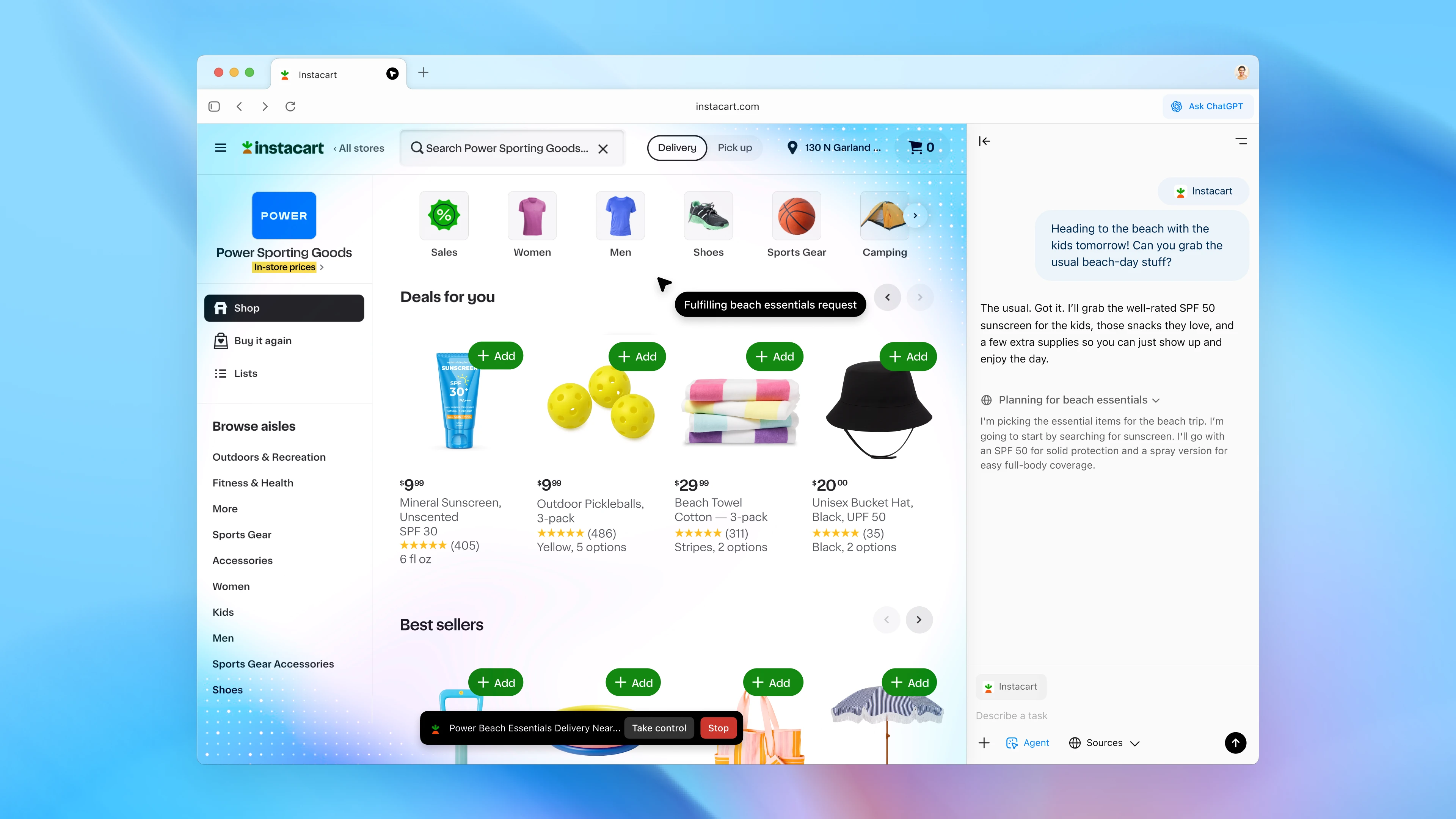
ChatGPT Atlas was a standalone web browser from OpenAI that put ChatGPT at the center of ordinary browsing instead of treating it as a separate tab. OpenAI described it as a browser where "ChatGPT can come with you anywhere across the web — helping you in the window right where you are, understanding what you're trying to do, and completing tasks for you, all without copying and pasting or leaving the page."
It was built on the same open-source Chromium engine that underpins Chrome and Edge, so day-to-day browsing looked familiar. The difference was an "Ask ChatGPT" sidebar that could see the page you were on, an optional browser-memory system that let ChatGPT recall what you'd looked at earlier, and an agent mode that could click, type, and navigate on your behalf inside the browser window. It was, in effect, OpenAI's attempt to turn the browser itself into what the company calls a "super-assistant."
Is ChatGPT Atlas still available to download right now?
No. As of this writing, ChatGPT Atlas is not something you can newly download, and if it's already installed on your Mac, OpenAI's own guidance is that it "may no longer open, browse, or support browser-based agentic workflows" after its August 9, 2026 cutoff date. Any website, ad, or shared link offering an "Atlas for Mac" or "Atlas for Windows" installer today is not pointing to an official OpenAI product — Atlas for Windows, iOS, and Android was promised at launch but was never actually released before OpenAI shut the whole browser down.
If you already have Atlas installed and relied on its bookmarks or history, OpenAI's help center recommends exporting your bookmarks to an HTML file and importing them into another browser such as Chrome before that data becomes inaccessible, since bookmarks, open tabs, and history do not transfer automatically.
The ChatGPT Atlas timeline, launch to shutdown
Atlas had a short public life. Here is how it played out, based on OpenAI's own announcement and release-notes pages:
| Date | Milestone |
|---|---|
| October 21, 2025 | ChatGPT Atlas launches worldwide on macOS for Free, Plus, Pro, and Go users; agent mode enters preview for Plus, Pro, and Business. |
| Late 2025 – early 2026 | OpenAI ships regular Atlas updates: tab groups, saved prompts, a revamped tab search, and agent-mode reliability improvements, per its release notes. |
| March 10, 2026 | Last dated build (1.2026.63.7) listed in OpenAI's public Atlas release notes. |
| July 9, 2026 | OpenAI announces it is deprecating Atlas and moving browsing/agent features into the ChatGPT desktop app and Codex. |
| August 9, 2026 | Atlas is scheduled to stop working; OpenAI warns it "may no longer open, browse, or support browser-based agentic workflows" after this date. |
OpenAI gave users roughly a 30-day window between the announcement and the shutdown to export bookmarks and switch to another browser. Less than a year separated the launch and the deprecation notice.
What Atlas could actually do
Whatever comes next from OpenAI will likely reuse the same ideas Atlas introduced, so it's worth knowing what those were:
- "Ask ChatGPT" sidebar. A sidebar available in any window that could summarize a page, compare products across tabs, or answer questions about whatever you were currently viewing, without switching tabs or copy-pasting content into a chat.
- Browser memories. An optional feature that let ChatGPT remember context from sites you visited — for example, job postings you'd browsed — so you could later ask it to summarize or act on that history. OpenAI said these memories were viewable, archivable, and deleted automatically if you cleared your browsing history.
- Agent mode. Building on the browser-independent ChatGPT agent OpenAI shipped earlier in 2025, agent mode in Atlas could open tabs, click through sites, fill out forms, and complete multi-step tasks such as adding groceries to a cart and checking out, while pausing for confirmation on sensitive sites like banks. It's the same underlying concept covered in our explainer on what an AI agent actually is and how it works.
- Privacy controls. A per-site toggle for "ChatGPT page visibility," an incognito mode that logged Atlas out of your ChatGPT account entirely, and a separate opt-in before any browsed content could be used for model training.
- Import on day one. New users could bring over bookmarks, saved passwords, and browsing history from their existing browser during onboarding.
"ChatGPT's agent capabilities still carry risk. Besides simply making mistakes when acting on your behalf, agents are susceptible to hidden malicious instructions, which may be hidden in places such as a webpage or email with the intention that the instructions override ChatGPT agent's intended behavior." — OpenAI, in its Atlas launch announcement
OpenAI was upfront about that risk from day one: agent mode could not run code in the browser, download files, or install extensions, and could not touch other apps or the file system, but the company still flagged prompt-injection attacks as an open problem it would "continually monitor and patch."
Which ChatGPT plans included Atlas
The Atlas browser itself was free to download and use on any ChatGPT account tier — Free, Go, Plus, and Pro at launch, with a beta for Business and admin-enabled access for Enterprise and Edu workspaces. Agent mode inside Atlas was the part gated by plan: it launched in preview for Plus, Pro, and Business subscribers only, and was not available on the Free or Go tiers. If you're trying to work out which ChatGPT tier makes sense for you now that Atlas is gone, our breakdown of ChatGPT, Claude, and Gemini plans and pricing covers what each current tier includes.
The system requirements Atlas needed
Even at its peak, Atlas was narrowly supported. OpenAI's own setup guide listed the requirements as:
- A Mac with an Apple Silicon (M-series) chip — Intel Macs were never supported.
- macOS 14.2 or later.
- Installation via a standard .dmg file: open it, drag Atlas into Applications, then launch it from Applications or Spotlight.
Windows, iOS, and Android builds were described as "coming soon" at launch but were never released in any public form before OpenAI retired the project, so there was never an official installer for those platforms to begin with.
Is ChatGPT Atlas safe? The real "malware" story
This is where things get genuinely important for anyone still searching for an Atlas download. OpenAI's own launch materials disclosed a real but narrow risk: prompt-injection attacks against agent mode, where hidden instructions on a webpage try to hijack what the agent does on your behalf. That's a legitimate, OpenAI-acknowledged limitation of agentic browsing in general, not a claim that the Atlas app itself contained malware.
Separately, and more relevant to anyone searching "chatgpt atlas malware mac" today, security researchers at Kaspersky documented an actual malware campaign that exploited public interest in Atlas. In research published December 15, 2025, Kaspersky described attackers buying paid Google search ads for queries like "chatgpt atlas" that led to a page hosted on chatgpt.com itself — a sanitized, shared ChatGPT conversation formatted to look like an "installation guide" for ChatGPT Atlas for macOS. That fake guide told visitors to copy a single Terminal command, which downloaded a script from an unrelated domain and then repeatedly requested the victim's system password before installing the AMOS (Atomic macOS Stealer) infostealer along with a persistent backdoor. Once installed, that malware went after browser passwords and cookies, cryptocurrency wallet data, and documents from the Desktop, Documents, and Downloads folders.
The takeaway isn't that Atlas itself was unsafe software — it's that the name "ChatGPT Atlas" became a lure attackers used to trick people into running Terminal commands, which is not how any legitimate browser is installed. The same pattern applies to any AI tool with buzz around it: a real installer never asks you to paste and run a command in Terminal, and it never demands your system password before the download even finishes.
Whether you're looking for Atlas specifically or any current ChatGPT app, the safe way to get it is the same:
- Only download from chatgpt.com or openai.com directly, typed into your browser rather than clicked from a search ad.
- Never paste a Terminal command from a webpage to "install" a browser, extension, or update.
- Be suspicious of any installation guide presented as a shared ChatGPT conversation link rather than an official OpenAI page.
- If a "helper script" asks for your Mac login password before anything visible has been installed, stop and close the window.
What replaces Atlas now
OpenAI's stated plan was never to abandon browser-based agentic work, just to stop maintaining it as a separate app. Per OpenAI's help center: "We're deprecating Atlas and moving browser-based agentic capabilities into ChatGPT and Codex. We are building on what we learned from Atlas to support a more capable browser experience in ChatGPT, including multiple tabs, downloads, improved navigation, account login support, and other browser improvements."
Concretely, that means a built-in browser inside the regular ChatGPT desktop app for both macOS and Windows, opened with Command+Shift+B on Mac or Ctrl+Shift+B on Windows. You and ChatGPT view the same page together, and ChatGPT can work across your open tabs, download files, or wait while you sign in to a site — the same underlying idea as Atlas's sidebar and agent mode, just inside an app most ChatGPT users already have installed rather than a second, separate browser they'd need to maintain. For lighter, in-browser help without installing anything new, OpenAI has also pointed users toward its Chrome sidebar experience where available.
Bottom line
ChatGPT Atlas was a real, fully-functional browser for about ten months, from October 21, 2025 to its scheduled shutdown on August 9, 2026 — not a rumor, and not vaporware, but also not a product you can go download today. If you see an "Atlas" download link now, treat it as a red flag rather than a shortcut, especially if it tells you to open Terminal and paste anything. For the actual features Atlas pioneered — an AI sidebar that understands your open tabs and an agent that can act on your behalf — the current home for that work is the ChatGPT desktop app itself, available the normal way through chatgpt.com.
Frequently asked questions
Can I still download ChatGPT Atlas?
No. OpenAI began deprecating Atlas on July 9, 2026, and the app was scheduled to stop working on August 9, 2026. There is no current official download; any site offering an Atlas installer today is not an official OpenAI source.
What was ChatGPT Atlas?
ChatGPT Atlas was a Chromium-based web browser from OpenAI, launched October 21, 2025, that built ChatGPT directly into browsing with an Ask ChatGPT sidebar, optional browser memories, and an agent mode that could act on pages for you.
Did ChatGPT Atlas ever come to Windows, iOS, or Android?
No. OpenAI said Windows, iOS, and Android versions were coming soon at the October 2025 launch, but none shipped publicly before OpenAI retired the entire Atlas project in August 2026.
Is ChatGPT Atlas linked to mac malware?
Atlas itself was not malware. But Kaspersky documented a real campaign where attackers bought search ads for chatgpt atlas and used a fake installation guide, hosted as a shared chatgpt.com conversation, to trick Mac users into running a Terminal command that installed the AMOS infostealer.
What replaced ChatGPT Atlas?
OpenAI moved browsing and agent features into the regular ChatGPT desktop app, which now includes a built-in browser on macOS and Windows opened with Command+Shift+B or Ctrl+Shift+B.
Which ChatGPT plans got access to Atlas?
Atlas itself was free on Free, Go, Plus, and Pro accounts, with a Business beta and admin-enabled Enterprise/Edu access. Agent mode inside Atlas required a Plus, Pro, or Business subscription.
Sources
- OpenAI: Introducing ChatGPT Atlasopenai.com
- OpenAI Help Center: Getting Started with Atlashelp.openai.com
- OpenAI Help Center: Evolving Atlas into ChatGPT for browser-based agentic workhelp.openai.com
- OpenAI Help Center: Using the built-in browser in the ChatGPT desktop apphelp.openai.com
- OpenAI Help Center: ChatGPT Atlas Release Noteshelp.openai.com
- Kaspersky: macOS infostealer campaign abusing ChatGPT chat-sharing featureme-en.kaspersky.com
Theo Park runs the AI desk at Pandromeda. He follows model launches from the frontier labs and the open-weight community, tracks the assistants and developer tools built on them, and explains what each release changes on pricing, capability and safety. His reporting leans on primary sources: model cards, technical reports, API documentation and the companies' own announcements.