Firefox 157.0.1 Is Out: Security Fix and Bug Patches for Nova
Mozilla's October 6 patch fixes three bugs and a moderate security flaw in Firefox 157.0.1, following close behind 157.0's biggest visual redesign in years.
Mozilla released Firefox 157.0.1 to the Release channel on October 6, 2026, a dot update that fixes three bugs and patches one moderate-severity security flaw. It arrives a week after Firefox 157.0, which brought the biggest visual overhaul to Firefox's toolbars, sidebar, and menus in years — so if you skipped straight to this patch, here's what you're actually updating into, and what to do if you haven't updated at all since late September.
Firefox 157.0.1 — the key facts
- Released: October 6, 2026 (Release channel)
- Type: Dot release — bug fixes plus one security fix
- Security advisory: MFSA 2026-104, moderate impact, CVE-2026-106016
- Follows: Firefox 157.0, first offered September 29, 2026, with the redesigned interface
- How to get it: Firefox updates itself automatically; check via the menu > Help > About Firefox
What Firefox 157.0.1 actually fixes
According to Mozilla's own release notes for 157.0.1, the update addresses three specific bugs that surfaced after 157.0 shipped:
- Downloads failing on macOS in cases where Firefox is set to ask where to save a file but doesn't have permission to access the Downloads folder.
- The sidebar getting stuck on the Bookmarks panel or the AI Chatbot panel for some users, rather than switching normally.
- The "Restore from Backup" option not appearing during onboarding on Windows, which affected people trying to migrate settings and data to a new install.
None of these are headline-grabbing new features — they're exactly the kind of rough edges that tend to show up once a major interface change like 157.0's reaches the full release population, and Mozilla's point releases exist specifically to clean them up quickly rather than waiting for the next monthly release.
The security fix: MFSA 2026-104
Firefox 157.0.1 also closes one security hole, documented in Mozilla Foundation Security Advisory 2026-104. Mozilla rates the issue's impact as moderate and describes it as a mitigation bypass in Firefox's file-handling component, tracked as CVE-2026-106016 and reported by security researcher Abdulrahman Alzahrani. Mozilla's advisory doesn't publish further exploitation detail, which is standard practice until a fix has had time to reach most users, and it links out only to the underlying Bugzilla bug tracking the issue. There's no indication in the advisory that the flaw was being actively exploited before the patch; it's a precautionary fix rather than an emergency one, but there's no real reason to put off updating since the patch is already rolling out automatically.
Mozilla's security advisories use a four-tier severity scale — low, moderate, high, and critical — and CVE-2026-106016 sits in the second tier from the bottom, below the high- and critical-rated bugs that typically prompt Mozilla to recommend updating immediately. That's a useful way to read the gap between this release and 157.0's own advisory below: a single moderate fix here, against a much larger batch rated high just a week earlier.
Catching up: what Firefox 157.0 actually changed
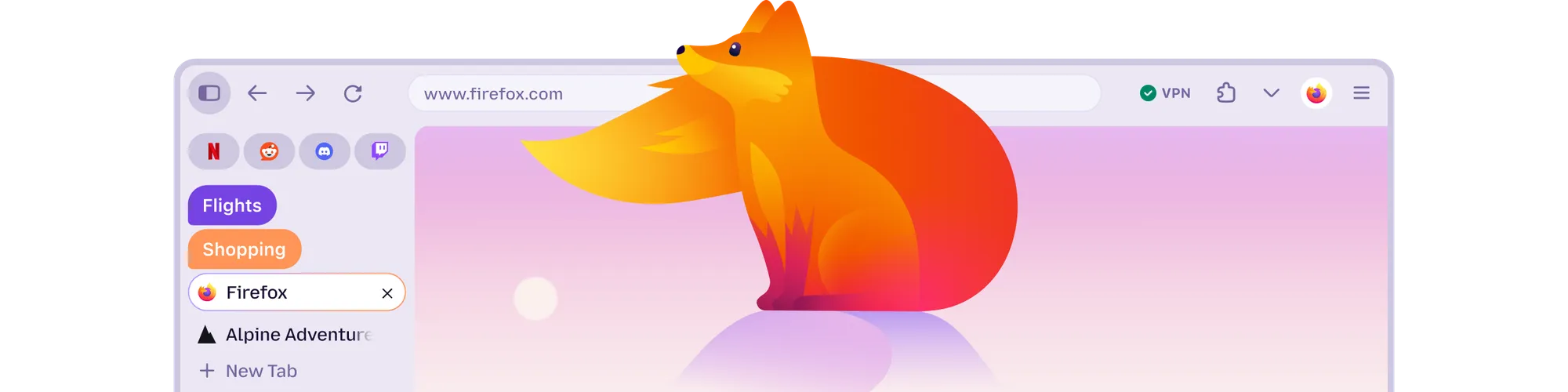
If your Firefox hasn't updated in a couple of weeks, 157.0.1 is going to look like a different browser than the one you remember. Firefox 157.0, first offered to Release channel users on September 29, 2026, shipped what Mozilla's own 157.0 release notes call "Firefox's biggest visual refresh in years" — a modernized design system across the toolbars, sidebar, menus, and individual features. Mozilla has internally referred to this redesign by the codename Project Nova (the name still shows up in image filenames on Firefox's own release-notes pages), though the company's stated intention is that once the rollout settles, people just call it Firefox.
The redesign isn't cosmetic-only. Mozilla also changed some long-standing defaults in 157.0: the revamped sidebar is now on for everyone, and the old "Show sidebar" toggle was removed (the previous sidebar can still be restored through the sidebar.revamp preference in about:config, which Mozilla says will remain available until the end of 2027). Pressing Tab now moves focus directly to the address bar's text field instead of the search-engine icon, reachable instead with Shift+Tab, and Amazon is no longer a built-in search engine, though it can still be added as a custom one. Mozilla also updated how in-page elements render: web page alert, confirm, and prompt dialogs, along with color pickers, date pickers, and form autocomplete drop-downs, now match whichever light or dark color scheme the page itself uses, rather than always following the browser's own theme.
None of this happened without friction. A visual overhaul this broad inevitably changes muscle memory — toolbar icons, spacing, and menu layouts that long-time Firefox users have clicked through for years all moved at once — and Mozilla built in escape hatches like the sidebar.revamp flag specifically so people could opt back into the previous layout while they adjust, or permanently if they prefer it. If you update straight from a pre-157.0 build to 157.0.1, expect to spend a few minutes re-finding settings that have shifted position rather than changed function.
New built-in themes
Firefox 157.0 ships a set of new built-in themes, each available in light and dark variants and switchable in a single click from Firefox's theme settings. They're part of the same design-system refresh as the toolbar and menu changes, intended to let people personalize the browser's look without installing a separate extension from addons.mozilla.org. Combined with the new dialogs and form controls that now follow a page's own light or dark scheme, the themes are the most immediately visible part of the update — the first thing most people will notice after the browser restarts post-update is the new default color treatment, even before they open a menu or the sidebar.
Compact Mode returns
157.0 also reintroduces Compact Mode as a supported, built-in density option. It trims the spacing around toolbar buttons and tabs to leave more room for actual web content, which Mozilla pitches as useful on smaller laptop screens or when running Firefox in a split-screen layout alongside other windows. Compact Mode had effectively been in limbo for years — the setting remained in Firefox's code but wasn't surfaced as a normal option in the interface — so its return as an officially supported density choice is one of the more practical changes in the 157.0 release, separate from the purely visual parts of the redesign. It's worth trying for anyone who felt the pre-157.0 toolbar already used too much vertical space, since it's now a first-class setting rather than a workaround.
Other changes worth knowing about in 157.0
A few additional changes in Firefox 157.0 are easy to miss but matter for specific users:
- Hardware AV1 decoding for WebRTC calls. On supported devices, Firefox can now decode AV1 video in hardware during WebRTC-based video calls instead of relying on software decoding — relevant for video-calling apps running inside the browser.
- A warning about TLS key logging. If Firefox is configured to log TLS encryption keys (typically for network debugging), it now displays a warning in the site-information panel and in Settings, since that configuration lets other software on the machine read encrypted traffic.
- Firefox Suggest expands in Europe. Address-bar suggestions from Firefox Suggest are now available in 16 more European countries, including Spain, Sweden, and Switzerland, and remain adjustable from the Firefox Suggest settings.
Other fixes already folded into 157.0
Alongside the redesign, Firefox 157.0's release notes list several smaller fixes that are easy to overlook but worth knowing if you ran into them on an older build. These are already included once you're on 157.0.1, so there's nothing extra to do beyond updating:
- Phone and tablet video appearing sideways or upside down during WebRTC calls.
- The address bar searching the text you'd typed instead of opening a suggestion you'd already selected, while a page was still loading.
- 8-bit HDR video looking dull and washed out on Windows.
- Audio and video falling out of sync after repeatedly changing playback speed, the kind of issue that shows up when scrubbing speed controls on sites like YouTube.
- The Vertical Tabs sidebar failing to reappear at the screen edge after entering full screen mode.
- The Windows taskbar showing up over full-screen video instead of staying hidden.
On the web-platform side, 157.0 also added support for the at-rule() function inside CSS @supports checks and a chain value for the overscroll-behavior property — both relevant mainly to web developers rather than everyday browsing. Mozilla's enterprise-specific policy updates and bug fixes for 157 are tracked separately in Firefox for Enterprise's own release notes rather than the consumer notes covered here.
157.0 vs. 157.0.1 at a glance
| Version | First offered | Type | Headline changes | Security advisory |
|---|---|---|---|---|
| 157.0 | September 29, 2026 | Monthly feature release | Redesigned toolbars/sidebar/menus, new themes, Compact Mode, hardware AV1 decoding for WebRTC, TLS key-logging warning, Firefox Suggest expansion | MFSA 2026-97 (high impact) |
| 157.0.1 | October 6, 2026 | Dot/point release | Fixes macOS download permissions bug, stuck sidebar panel, missing Windows backup-restore option during onboarding | MFSA 2026-104 (moderate impact) |
Firefox 157.0's own security advisory, MFSA 2026-97, rates its overall impact as high and covers a larger batch of fixes than 157.0.1's single moderate issue — Mozilla's advisory notes that it now issues a separate advisory entry for each individual bug rather than rolling memory-safety fixes into one combined listing, which is why that advisory lists many individual entries rather than a short summary. Anyone still on a pre-157.0 build should treat 157.0.1 as covering both rounds of fixes at once, since it includes everything from 157.0 plus its own patch.
How to update to Firefox 157.0.1
Firefox checks for updates automatically and typically installs them in the background, but you can trigger and confirm it manually: open the menu button in the toolbar, go to Help, and choose "About Firefox." That opens a window that checks for a newer version, downloads it if one exists, and shows a Restart button once the download finishes — the update only takes effect after Firefox relaunches. Mozilla's own update support article notes a few exceptions: installs from the Microsoft Store update through the Store itself, and Linux users running a distribution's packaged build need to wait for their distro's repository to publish the new package. Firefox's full build lineup remains available from the official download page if a fresh install is easier than waiting on an automatic update — a useful fallback if you're coming from an older build and want 157.0's interface changes along with 157.0.1's fixes in one step, similar to how other browser makers have been pushing out dot releases of their own lately, as with Chrome's recent 155 update.
What's next
Mozilla ships Firefox on a roughly four-week cadence, which puts the next scheduled feature release, Firefox 158, in mid-October 2026. Expect any further rough edges from the 157.0 redesign — themes, Compact Mode, or the now-default sidebar — to keep getting ironed out in point releases like 157.0.1 before 158 lands with its own changes. If Mozilla publishes a 157.0.2 or any additional advisories before then, this article will be the place to check back.
For anyone who's been putting off updating because a redesign this size felt like a bigger commitment than a routine patch, 157.0.1 is a reasonable moment to do both at once: you pick up October's security fix along with everything from late September's interface overhaul, in a single automatic update rather than two separate ones. In the meantime, keeping Firefox's automatic updates turned on remains the simplest way to pick up both feature changes and security patches as Mozilla ships them, the same practice worth following for other frequently updated developer tools that ship fixes between major versions.
Frequently asked questions
When was Firefox 157.0.1 released?
Mozilla began offering Firefox 157.0.1 to Release channel users on October 6, 2026, one week after Firefox 157.0 first shipped on September 29, 2026.
What bugs does Firefox 157.0.1 fix?
It fixes three issues: downloads failing on macOS when Firefox lacks permission to access the Downloads folder, the sidebar getting stuck on the Bookmarks or AI Chatbot panel for some users, and the Restore from Backup option not appearing during Windows onboarding.
Is Firefox 157.0.1 a security update?
Yes. It includes one security fix, cataloged as CVE-2026-106016 under Mozilla's advisory MFSA 2026-104, described as a moderate-impact mitigation bypass in Firefox's file-handling component.
What is the Nova redesign in Firefox 157.0?
It's Mozilla's codename for Firefox 157.0's interface overhaul, which Mozilla's own release notes call the browser's biggest visual refresh in years, covering the toolbars, sidebar, menus, new built-in light and dark themes, and a returning Compact Mode density option.
How do I update Firefox to version 157.0.1?
Open the Firefox menu, go to Help, then About Firefox; the window checks for and downloads any update automatically, and clicking Restart applies it. Microsoft Store and Linux-distribution installs update through those channels instead.
If I'm still on an older version of Firefox, does updating to 157.0.1 include the 157.0 redesign too?
Yes. Point releases include everything from the version they follow, so updating directly to 157.0.1 from an older build brings both the Nova redesign from 157.0 and 157.0.1's own bug and security fixes in one step.
Sources
- Firefox 157.0.1 Release Notes — Mozillafirefox.com
- Firefox 157.0 Release Notes — Mozillafirefox.com
- Mozilla Foundation Security Advisory 2026-104mozilla.org
- Mozilla Foundation Security Advisory 2026-97mozilla.org
- Update Firefox to the Latest Release — Mozilla Supportsupport.mozilla.org
- Download Firefox — Mozillafirefox.com
Felix Moreau writes Pandromeda's software coverage and how-to guides. He covers Windows, macOS and Linux updates, the apps people rely on, emulators and developer tools, and turns official documentation into clear, numbered steps that work on the current version.