ConnectWise Cloud Backup Breach: What Happened, Who's Hit
A compromised vendor credential for ConnectWise's Cloud Backup app let an attacker sign into dozens of customers' Microsoft 365 tenants before ConnectWise shut the app down.
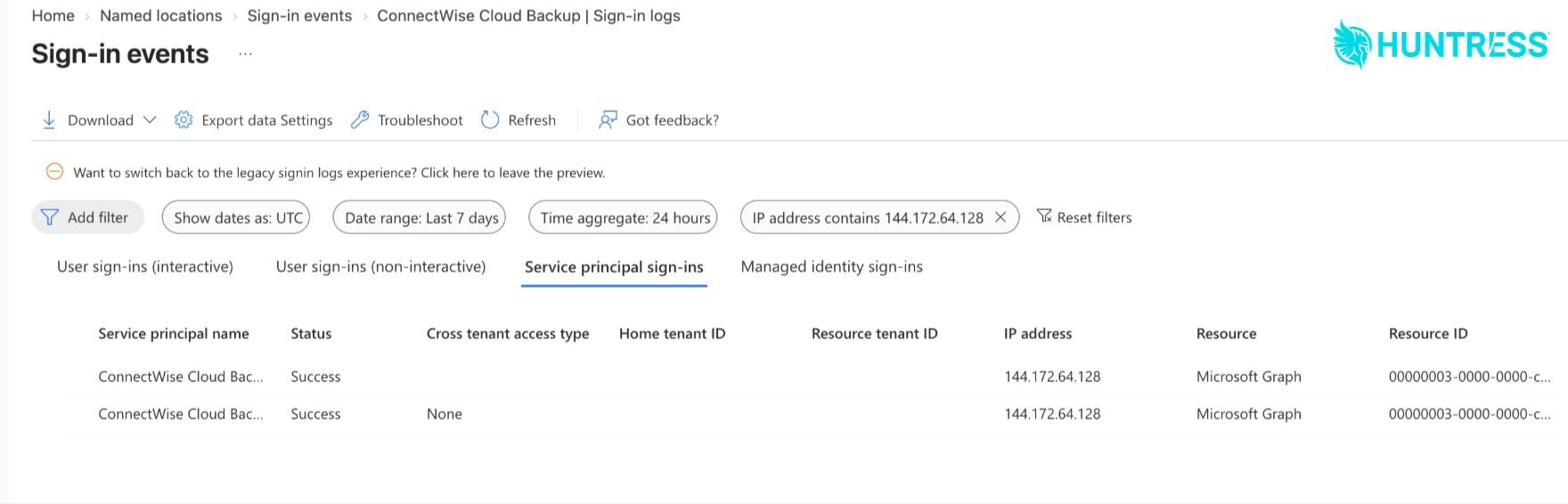
A stolen credential for the ConnectWise Cloud Backup app, the Microsoft 365 backup product ConnectWise acquired as SkyKick in 2024, let an unknown attacker sign directly into customer Microsoft 365 tenants on October 15, 2026, pulling access tokens from roughly 06:13 to 08:34 UTC. Security firm Huntress, which first spotted the activity, had confirmed unauthorized sign-ins across 162 tenants as of 19:00 UTC on October 16. ConnectWise disabled the Cloud Backup app and several related Cloud Management applications on October 17 and, as of October 19, has not said when the service will come back online.
- What: A compromised vendor credential for the ConnectWise Cloud Backup (formerly SkyKick) application was used to request Microsoft Graph access tokens for customer Microsoft 365 tenants, without any user sign-in or MFA prompt.
- When: Main sign-in sweep October 15, 2026, 06:13-08:34 UTC. Earlier probing from October 13.
- Who's affected: At least 162 Microsoft 365 tenants with confirmed unauthorized sign-ins, per Huntress; a much larger set of tenants (nearly 1,000) saw sign-in attempts from the attacker's IP address, though most failed.
- App ID: ConnectWise Cloud Backup (SkyKick) service principal
506e08f9-6e9a-4da4-942b-a099a03644ae. - Attacker IP: 144.172.64.128 (hosting provider, not Microsoft/Azure address space); ConnectWise later added 144.172.64.99 and 144.172.64.60.
- Vendor action: ConnectWise disabled the affected application identities and revoked credentials on October 17; Cloud Backup, Cloud Management, and SaaS Security remain suspended as of October 19.
What happened
ConnectWise Cloud Backup is a cloud-to-cloud backup product for Microsoft 365 mailboxes, OneDrive, SharePoint, and Teams data, sold mostly through managed service providers (MSPs). Like most backup tools of its kind, it works by having customers grant it an OAuth app registration in their Microsoft Entra directory with broad, non-interactive permissions to read and write Microsoft 365 data on an ongoing basis — the same model used by countless backup, migration, and reporting tools.
According to Huntress's research team, someone obtained a valid credential for that Cloud Backup service principal and used it to request Microsoft Graph access tokens directly, bypassing any need for a user to sign in or approve an MFA prompt. Because the credential lived in ConnectWise's own tenant rather than a customer's, Huntress says no action by a customer administrator could have caused the exposure. The affected app normally authenticates from Microsoft Azure's own IP ranges; on October 15, Huntress instead saw it authenticate from 144.172.64.128, an address belonging to a commercial hosting provider.
Huntress also found that several other ConnectWise "Cloud Management" applications were abused around the same time. In at least one partner's tenant, the Cloud Management Microsoft Teams app added itself to the Global Administrator role twice within a few minutes, then used that access to plant new, long-lived client secrets — set to expire in 2028 — on two other trusted applications, including Huntress's own security platform app. Huntress says it found and removed the unauthorized credential from its own application on October 16.
Timeline of the incident
Huntress's published timeline, corroborated by ConnectWise's own updates to partners, lays out a multi-stage operation rather than a single break-in. All times are UTC.
| When | What happened |
|---|---|
| Oct 13-14 | Password-guessing attempts against accounts at four law firms from 144.172.64.128, using a scripted curl client. Two accounts were locked out. |
| Oct 15, from ~01:58 | ConnectWise Cloud Management service principals granted themselves directory roles, mostly Exchange Administrator, in roughly 50 tenants Huntress monitors. |
| Oct 15, 03:44-03:49 | In one partner's tenant, the Cloud Management Teams app elevated itself to Global Administrator, then added new secrets to two other apps, including Huntress's own, set to expire in 2028. |
| Oct 15, 06:13-08:34 | Main sweep: the Cloud Backup (SkyKick) app authenticated from 144.172.64.128 and pulled Graph tokens across tenants in sorted order, seconds apart — consistent with an automated script working a target list. |
| Oct 15, 09:25-14:20 | A second, more targeted wave hit 16 organizations in policy, national security, trade, and critical-minerals sectors; most attempts failed because those tenants had no ConnectWise app present. |
| Oct 16 | Huntress identifies and removes the rogue credential from its own application; publishes initial findings with a confirmed count of 162 affected tenants as of 19:00 UTC. |
| Oct 17 | ConnectWise disables seven application identities, revokes their certificates, and invalidates the shared Cloud Backup credential. |
| Oct 18-19 | ConnectWise shares additional attacker IP addresses; Cloud Backup, Cloud Management, and SaaS Security remain offline, with no restoration date given. |
How many customers are actually affected?
The honest answer is that the number is still moving, and different figures describe different things. Huntress's own confirmed count — tenants where it verified unauthorized sign-ins actually succeeded — stood at 162 as of 19:00 UTC on October 16, the figure given in its own research post. Separately, Huntress says it found sign-in attempts from the attacker's IP address against nearly 1,000 Microsoft 365 tenants, of which just over 300 succeeded; that broader number captures every tenant the attacker's script touched, not every tenant it meaningfully compromised, and Huntress has not said all of that activity was the same operator. Some outside write-ups have circulated a slightly higher tenant count in the 170s; Pandromeda was not able to confirm that specific figure against a primary source as of publication, so treat it as unverified for now.
ConnectWise itself has not published its own tenant count publicly. The company says it has found no evidence that customers' actual backup archives — the stored data itself — were accessed, even in tenants where the app's credentials were abused to sign in.
How the attacker got in
This wasn't a phishing email or a guessed password on a help-desk account. The ConnectWise Cloud Backup app uses what's known as an OAuth client-credentials flow: once a customer consents to the app, ConnectWise's infrastructure can authenticate as that app and pull a Microsoft Graph token for the customer's tenant without any human in the loop. That's normal and necessary for an unattended backup job that runs every night — but it also means that whoever holds the app's credential can do the same thing from anywhere, for any tenant that granted consent, with no MFA prompt to block them and no obvious sign-in event for a user to notice.
ConnectWise has said the investigation identified "compromised application identities" but has not disclosed how the underlying credential was obtained, and has said it has not established whether a product vulnerability contributed. That's a meaningfully different, and in some ways more concerning, failure mode than a typical breach: it's a reminder that any vendor app with standing access to your Microsoft 365 tenant is effectively an extension of your own attack surface, similar to the kind of vendor-side flaw that turned the Ivanti Connect Secure zero-day into a root-access problem for everyone running the affected appliance, not just the vendor.
What ConnectWise has said and done
ConnectWise's public remediation guidance and the trust center advisory it set up for the incident describe a response that moved in stages: investigate, disable, warn, and guide. On October 17, the company disabled seven affected application identities, revoked their certificates, and invalidated the shared Cloud Backup credential that had been abused. That took the Cloud Backup, Cloud Management, and SaaS Security products offline for every customer, not just the ones known to be affected — ConnectWise has said it cannot see into customer tenants well enough to limit the shutdown more narrowly.
As of October 19, the company has not set a timeline for restoring service. It has told partners that existing backup archives remain encrypted and isolated, with no indication they were accessed, and it has warned that access tokens issued before the shutdown may stay valid until they naturally expire — meaning disabling the app doesn't automatically undo anything an attacker already did inside a customer's tenant. ConnectWise says it has engaged an outside forensics firm and published a technical investigation and remediation guide for MSPs, and has asked resellers and marketplace partners to make sure that guidance reaches customer administrators directly. The company's trust center is the best place to check for updates, since the investigation is ongoing and guidance may change.
What Huntress found
Huntress has been the most detailed public voice on the technical side of this incident. Beyond the sign-in and credential-abuse timeline above, its researchers note that in the one tenant where they examined audit logs in detail, they found no recorded evidence of mail or file access — but they're careful to flag that Microsoft doesn't log every kind of Graph-based data read an application can perform, so that finding doesn't rule out quieter data access elsewhere. Huntress has also published a list of indicators of compromise, including the attacker IP addresses, the ConnectWise Cloud Backup app ID, several related Cloud Management app IDs, and the user-agent strings seen on the suspicious credential and role changes (unusual Python-based clients, rather than the vendor's normal automation signature).
Huntress's central piece of advice is blunt: disable the ConnectWise apps now, even if your own logs look clean, because a clean result doesn't rule out access and the credential worked against every tenant that had consented to the app.
What Microsoft has said
Microsoft, whose Microsoft 365 and Entra ID platforms sit at the center of this incident, has not published a full incident report of its own as of this writing. Microsoft's threat intelligence team did characterize the incident publicly as a supply-chain attack — a framing that fits the pattern: a single compromised vendor credential reached the tenants of potentially hundreds of separate MSPs and their end customers at once, none of whom did anything wrong on their own end. Microsoft 365 customers affected by this incident are, in effect, collateral damage from a breach that happened entirely inside a vendor's infrastructure.
Why this matters beyond ConnectWise's customer base
Every MSP tool that touches Microsoft 365 — backup, email security, RMM, SaaS management — typically holds a standing OAuth grant with elevated Graph permissions across every tenant it serves. That architecture is what makes multi-tenant tooling useful, and it's also what makes a single compromised vendor credential so disproportionately damaging: one leak doesn't just affect the vendor, it potentially affects every downstream customer that ever consented to the app, going back years. Security teams have raised this concern about MSP tooling for years; this incident is one of the more concrete, public illustrations of it actually playing out, following a wave of similar vendor-side compromises and zero-days across the IT management software sector over the past two years.
For end users, the practical takeaway isn't that ConnectWise or Microsoft 365 are uniquely unsafe — it's that any one of the dozens of vendor apps with access to your organization's cloud identity is a potential blast-radius multiplier, and most organizations have far less visibility into those apps' activity than they do into their own employees' sign-ins.
What admins and affected organizations should do right now
If your organization — or a managed service provider acting on your behalf — ever enabled ConnectWise Cloud Backup, SkyKick, or related Cloud Management apps against your Microsoft 365 tenant, treat this as active until ConnectWise confirms otherwise.
| Step | Where / how |
|---|---|
| Check service principal sign-ins | Entra admin center > Identity > Monitoring & health > Sign-in logs > Service principal sign-ins tab. Filter by app ID 506e08f9-6e9a-4da4-942b-a099a03644ae and watch for sign-ins from 144.172.64.128, .99, or .60, or any non-Microsoft IP range. |
| Disable, don't delete, the app | Disable the ConnectWise Cloud Backup / Cloud Management enterprise applications in Entra. Deleting removes consent entirely and requires re-approval later; disabling is reversible once ConnectWise confirms credentials are clean. |
| Search for every related app | Search Entra enterprise applications for "ConnectWise" and "SkyKick," including the legacy name "SkyKick Cloud Manager." Disable anything you can't account for. |
| Audit directory role assignments | Check whether any ConnectWise/SkyKick service principal holds Global Administrator, Exchange Administrator, or Privileged Authentication Administrator, and remove roles you didn't intentionally grant. |
| Review app credentials tenant-wide | Audit all app registrations and enterprise apps for client secrets or certificates added since October 13 that you can't account for — including ones added to unrelated apps, and watch for unusually distant expiration dates. |
| Rotate credentials broadly | Treat this as a prompt to rotate stored admin and service credentials generally and review how they're stored; a password manager with strong vault security and audit logging, as compared in Pandromeda's LastPass vs. 1Password breakdown, makes this kind of rotation much faster next time. |
| Keep apps disabled for now | Don't re-enable any ConnectWise Cloud Backup or Cloud Management app until ConnectWise's trust center confirms credentials have been fully reset. |
Keep an eye on both ConnectWise's own advisory page and Huntress's research blog for updates, since the investigation is active and both vendors have already revised their guidance more than once since October 15.
Frequently asked questions
What happened in the ConnectWise Cloud Backup breach?
A credential for ConnectWise's Cloud Backup app (formerly SkyKick) was compromised and used to sign in directly to customer Microsoft 365 tenants on October 15, 2026, without any user sign-in or MFA prompt, according to Huntress's research team.
How many organizations are affected?
Huntress had confirmed unauthorized sign-ins across 162 Microsoft 365 tenants as of 19:00 UTC on October 16. A broader set of nearly 1,000 tenants saw sign-in attempts from the attacker's IP address, though most failed. Some other reports have cited a higher figure in the 170s that could not be independently confirmed against a primary source.
Was my Microsoft 365 data or backup data accessed?
ConnectWise says it has found no evidence that stored backup archives were accessed. Huntress says that in the one tenant it examined in detail it found no recorded mail or file access, but cautions that Microsoft doesn't log every type of Graph-based data read, so access elsewhere can't be fully ruled out.
Is ConnectWise Cloud Backup safe to use right now?
ConnectWise disabled the Cloud Backup app and related Cloud Management applications on October 17 and, as of October 19, had not set a restoration date. Huntress and ConnectWise both recommend keeping the app disabled until ConnectWise confirms credentials have been fully reset.
What should admins check immediately?
Review Entra service principal sign-in logs for the Cloud Backup app ID (506e08f9-6e9a-4da4-942b-a099a03644ae) and for sign-ins from 144.172.64.128, .99, or .60; disable (don't delete) any ConnectWise or SkyKick apps; audit directory role assignments and app credentials added since October 13; and rotate stored admin credentials as a precaution.
Who discovered the breach?
Huntress, a managed detection and response firm, first identified and publicly reported the unauthorized sign-in activity, publishing its findings and indicators of compromise starting October 16.
Sources
Sana Qureshi runs the security and privacy desk. She reports on actively exploited vulnerabilities, vendor patches and data breaches, and covers the password managers, VPNs and authentication tools readers use to protect themselves. Her alerts cite vendor advisories, CISA and the CVE record directly.